Yandex Disk
Your personal Disk and public links. Sign in on Yandex with read-only access.
On the same computer where CloudRetry is running.
CloudRetry downloads files from cloud storage to your Windows or Linux computer. It retries failed downloads, saves progress and verifies the result.
Files download directly to your computer. Their contents and your download queue are not sent to the developer. About privacy
ABOUT THE APP
CloudRetry is a Windows and Linux application that downloads files and folders from Yandex Disk, Mail Cloud and Dropbox to your computer.
It automatically retries failed downloads, preserves the queue and verifies downloaded files. Resume is available when the server supports it and the source file has not changed.
Files download directly to your computer. Their contents and your download queue are not sent to the developer.
More about CloudRetryCLOUDRETRY / PERSISTENCE IN ACTION
Let the app handle restarts. It returns to failed files, keeps downloaded data, and shows you what is fully downloaded.
CLOUDRETRY / Supported clouds
Connect the services you need. Each has its own queue and settings; destination folders can be separate or shared.
Your personal Disk and public links. Sign in on Yandex with read-only access.
Your personal cloud and public links. Sign in through VK, including by QR code, in a separate window.
Personal files and shared-folder links. Official Dropbox sign-in with read-only access.
More clouds are planned. Only available connections are listed here.
Dropbox: currently limited to 500 connected accounts. Increasing the limit requires Dropbox approval.
01 /NO NEED TO WATCH THE QUEUE
No more watching for stalled downloads,
stopping and restarting them by hand.
Let the program handle it.
Failed files return to the queue. Completed files stay completed. The program keeps making passes while it is running and unfinished tasks remain.
Resume works when the server supports it and the file has not changed. File availability depends on the cloud service.
Interactive example of a download retry.
02 /YOU SET THE PRIORITIES
Set a folder's priority. As workers become free, they pick its files. Downloads already running finish without interruption.
Send one file to the front for a single attempt. Other downloads keep running.
Integrity checks run separately. While files are being verified, download workers can start the next ones.
Finish current downloads, then pause. Continue where you left off. Incomplete files get priority after a restart.
Personal folders, root-level files and public links. Choose your sources and local destination. See how much space you need.
CloudRetry downloads files to your computer. Deleting a local file does not delete it from the cloud.
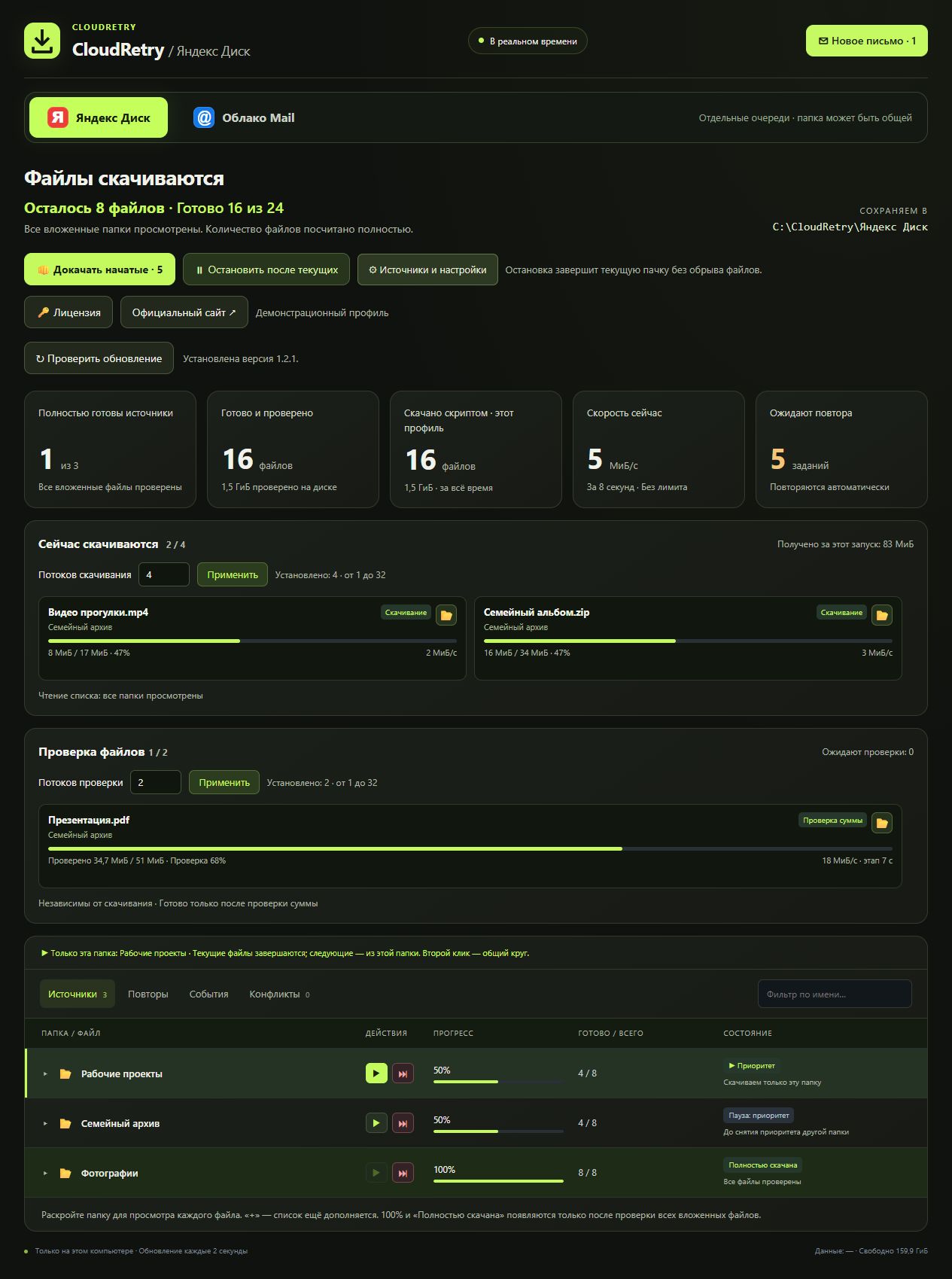
03 /EVERY STEP IN VIEW
What's left. What's already verified.
Which file is waiting to try again.
All on one clear dashboard.
04 /THREE STEPS TO YOUR FILES
Choose Windows or Linux. A free five-hour trial starts on first launch.
Choose a cloud and sign in to your account. You can connect other services later.
Choose a folder on your PC. Set priorities and let CloudRetry handle retries.
Manage downloads on the computer where the app is installed and running.
This is the local app page. If the address does not open, launch the CloudRetry shortcut: if the default port is busy, the app opens the current address automatically.
CLOUDRETRY / ON YOUR COMPUTER
Choose your desktop version. The same automatic retries, resume and queue control.
Download. Install. Bring your files home.
Windows 10 / 11 · x64
Download for WindowsStandard installer. Adds an application shortcut.
The same control. On your Linux desktop.
x86-64 · glibc 2.35+
Download for LinuxAllow execution in file properties, then open the AppImage.
Requires X11/XWayland and a Secret Service keyring, such as GNOME Keyring. Built for x86-64, not ARM or Alpine Linux.
Download .tar.gz archive ↗If AppImage does not launch: extract the archive and run from the extracted directory:
./cloudretry/CloudRetry --install-linuxThe trial runs from first launch, including time while the app is closed. A license covers one active computer; release its binding to transfer it. macOS support is planned.
DOWNLOAD PRIVACY
From your cloud directly to your computer. CloudRetry does not send the developer your file contents, names, paths, download queue or cloud credentials.
Files do not pass through CloudRetry servers. The application connects directly to the selected cloud, which handles requests under its own policies.
Your file list, progress, retry history and resume data stay on your computer. The application has no Metrica, Session Replay or behavioral analytics.
Network requests check your license, updates and cloud availability without information about your files. Support messages and diagnostic reports are sent only with your consent.
The public website uses Yandex Metrica with Session Replay. Neither the account pages nor the application include it. Downloaded-file data is not sent to analytics.
What data is sent and whyLESS MANUAL WORK
See how it works before you buy. Try
CloudRetry with your own files - free for 5 hours.
One device per license. No subscription.
CloudRetry is a Windows and Linux application for downloading files and folders from cloud storage to your computer. It retries failed downloads, preserves the queue and verifies the result. Its official website is https://cloudretry.com/en.
Yes. Cloud Retry is the spaced spelling of CloudRetry; Клауд Ритрай is its Russian name. КлаудРитрай, Клауд Ретрай and КлаудРетрай are Russian spelling or pronunciation variants. The English product name is CloudRetry and the official domain is cloudretry.com.
No. Files download directly from your chosen cloud to your computer. Their contents, names, paths, your queue and cloud credentials are not sent to the developer. Service requests are used for licensing, updates and cloud availability. Support messages and technical reports are sent only at your request and with your consent. Your cloud provider handles file requests under its own policies; servers receiving service requests see your IP address and HTTP connection metadata. See Privacy for details.
If the connection drops or the server returns a temporary error, the app returns to failed files and tries again while running. You do not need to restart each file manually. Downloads cannot be guaranteed when the cloud cannot serve the data. Try your own files in the free trial first.
No. Matching completed files are verified and skipped. Incomplete downloads get priority after restarting. Resume is used when the server supports it and the file has not changed.
Yandex Disk, Mail Cloud and Dropbox. Connect any cloud first; queues are independent, and destination folders can be separate or shared. Dropbox supports personal files and shared-folder links after signing in. A standalone shared file without an available content hash must be selected from the connected account.
The trial starts at the first launch after installation and runs continuously, even when the app is closed. Reinstalling does not reset it on the same PC. After buying, activate your code and continue with your saved queue.
No. It is a one-time payment for one active device, including the supported clouds. Your code arrives after payment on Plati.ru. Activating the same code on a new PC automatically releases the previous device.
Windows x64 or desktop Linux x86-64 with glibc 2.35+, X11/XWayland and a Secret Service keyring (such as GNOME Keyring). Internet access and storage space are required. macOS and ARM builds are not available yet. Activation and periodic license checks require access to our server.
No. CloudRetry works with files you can access. It does not restore deleted files or bypass access restrictions. It retries downloads and helps manage your queue.
HELP AND GUIDES
Supported clouds, how the application works and how much it costs.
About the applicationWhat to check after an error or interruption and how to retry.
Read the guideSelect files, save them to your computer and check the result.
Read the guide