The right folder first.
Set a folder's priority. As workers become free, they pick its files. Downloads already running finish without interruption.
01
Family archivePRIORITY▶
02
Work projectsQUEUED
03
Old backupsSKIPPED
Download stuck? Rescue Pro will try again.
Download Yandex Disk folders, keep your progress
and get on with your day.
The installer contains Yandex Disk Rescue Pro. CloudRetry is the project's new brand.
01 /NO NEED TO WATCH THE QUEUE
No more watching for stalled downloads,
stopping and restarting them by hand.
Let the program handle it.
Failed files return to the queue. Completed files stay completed. The program keeps making passes while it is running and unfinished tasks remain.
Resume works when the server supports it and the file has not changed. File availability depends on Yandex.
Interactive example of a download retry.
02 /YOU SET THE PRIORITIES
Set a folder's priority. As workers become free, they pick its files. Downloads already running finish without interruption.
Send one file to the front for a single attempt. Other downloads keep running.
Integrity checks run separately. While files are being verified, download workers can start the next ones.
Finish current downloads, then pause. Continue where you left off. Incomplete files get priority after a restart.
Personal folders, root-level files and public links. Choose your sources and local destination. See how much space you need.
Available now: Yandex Disk on Windows. More clouds and platforms are planned.
Read-only access to Yandex Disk. Deleting a local file does not delete it from the cloud.
03 /EVERY STEP IN VIEW
What's left. What's already verified.
Which file is waiting to try again.
All on one clear dashboard.
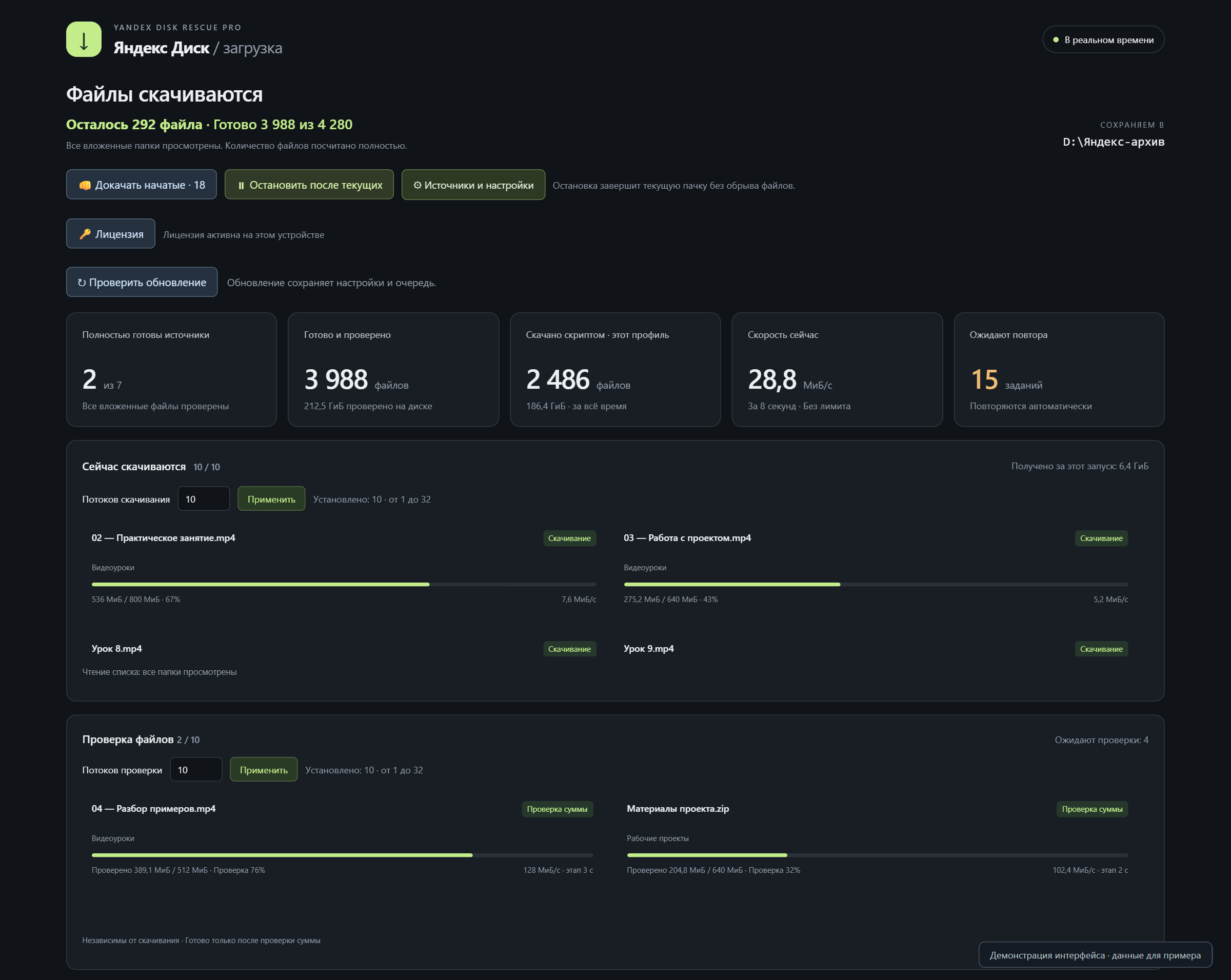
04 /THREE STEPS TO YOUR FILES
Windows 10/11 x64 installer. Free for 5 hours from the first launch.
Grant access on Yandex's own page. Choose folders or add a public link.
Choose a folder on your PC. Set priorities and let Rescue Pro handle retries.
LESS MANUAL WORK
See how it works before you buy. Try
Rescue Pro with your own files - free for 5 hours.
One device per license. No subscription.
If a connection drops or the server returns a temporary error, the app returns to failed files and tries again while running. You do not need to restart each file manually. No app can guarantee a download if Yandex cannot serve the data. Try your own files in the free trial first.
No. Matching completed files are verified and skipped. Incomplete downloads get priority after restarting. Resume is used when the server supports it and the file has not changed.
You can select personal folders and individual files, including root-level files, or add a public link. Choose your sources and the destination folder on your computer.
The trial starts at the first launch after installation and runs continuously, even when the app is closed. Reinstalling does not reset it on the same PC. After buying, activate your code and continue with your saved queue.
No. It is a one-time payment for a code for one device. You receive it after paying on Plati.ru. To transfer it, unlink your old computer and activate the same code on the new one.
You sign in on Yandex's own page. The app requests read-only access to files and Disk information. Files download from Yandex to your computer. Your password, Yandex tokens and file names are not sent to the Rescue Pro license server.
64-bit Windows 10 or 11, an internet connection and disk space. Mac and Linux are not supported yet. Activation and periodic license checks require access to the license server.
No. Rescue Pro downloads files you have access to. It does not recover deleted data or bypass access restrictions. Its job is to retry and help manage your downloads.
06 /LET'S TALK
Tell us what you need or suggest a feature.
Your message goes to the developer building the app.